

What is Ad Note?
Ad Note is an advertiser community platform where publishers can list their advertising inventory. By joining Ad Note, your Ad Products gain visibility in the marketplace, enabling discovery by more advertisers.Benefits of Joining
Campaigns executed through Ad Note are subject to agency commission fees per the Ad Control Terms of Service.
Requirements
Before applying, ensure you have:- An active Ad Control Console account
- Completed business information and payout account setup
- Ad Product public registration: Set Ad Products you want to sell through Ad Note to ‘public’ status, and set products excluded from sale to ‘private’.
All Ad Control plans, including the free Stream plan, are eligible to join Ad Note. However, to offer instant booking to advertisers, you need a Wave plan or higher and at least one published Ad Product.
How to Join
Click the Join Ad Note button in the Settings menu sidebar to view a checklist of required items. Complete each item to enable your application.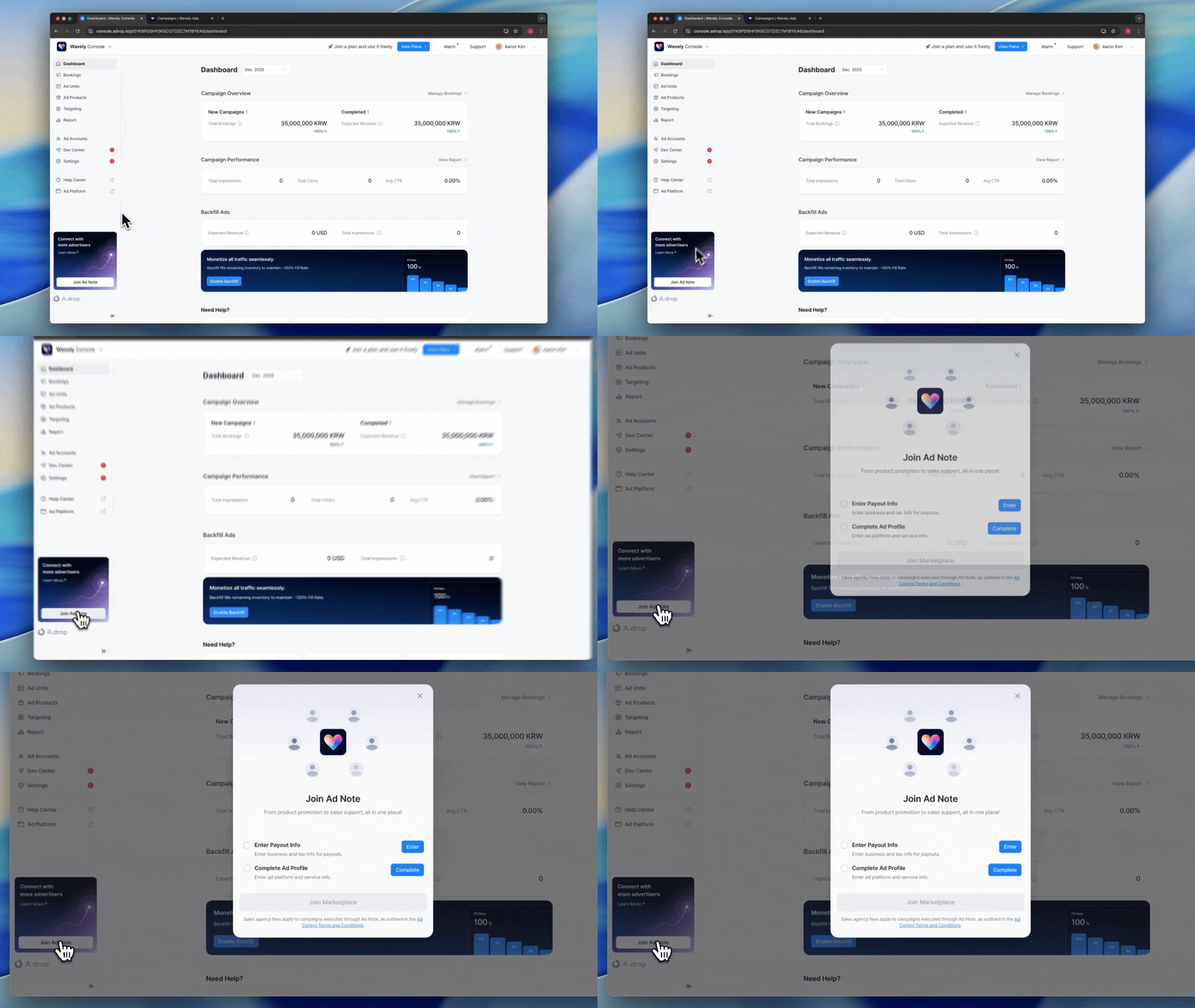
Checklist
1
Enter Payment & Billing Information
Register your business information and payout account for receiving Ad Note campaign revenue.
- Click Settings in the left menu.
- Select the Revenue Payout tab.
- Enter the following information:
- Business name
- Business registration number
- Business registration certificate file
- Billing contact email
- Account holder name
- Bank
- Account number
- Bank statement copy
Revenue Payout Settings
View detailed setup instructions
2
Complete Ad Profile
Configure your Ad Platform information and service details that will be displayed to advertisers.
- Click Settings in the left menu.
- Select the Ad Profile tab.
Ad Platform Information
Service Information
Ad Note Brochure UploadUpload a PDF brochure for advertisers. The AI agent will analyze this to automatically recommend products to advertisers.Service Description
Use the Preview button to verify how your information displays on the Ad Platform and Ad Note.
Submit Application
Once all checklist items are complete, the Join button will be enabled.- Complete all checklist items.
- Click the Join button.
- Our team will review your application.
- Once approved, your Ad Products will automatically appear in the Ad Note community.
When your application is submitted, you’ll see the message: “Your Ad Note application has been submitted. Your listing will appear on Ad Note after review is complete.”
After Joining
Real-time Sync
Profile updates in Console sync to Ad Note instantly. Changes to product information, service descriptions, or promotional materials take immediate effect.Promotion Management
You can create promotions to attract advertisers. They will be posted on the promotions page when you join Ad Note.Promoting Ad Products
Learn how to set up discounts and free trials
Operating Policy
The following policies apply to campaign booking, approval, and settlement through Ad Note.Campaign Terms
Advertisers book campaigns based on the Ad.Note Campaign Terms, not individual publisher policies. Agency commission policies and cancellation penalty policies also follow Ad Note’s common standards.Campaign and Creative Approval
Cancellation Penalties
Campaign booking is confirmed upon publisher approval. If an approved campaign is cancelled due to unilateral reasons by the publisher, cancellation penalties will be charged according to the Ad.Note Campaign Terms.Ad Spend Settlement
Ad spend settlement is handled directly between Adrop and the advertiser. Agency commission (incentive) policies are applied flexibly according to Ad Note policies.Fee Information
Sales Commission For campaigns connected through Ad Note, revenue is paid after deducting a 20% commission from ad spend. However, if there is a separate sales partnership agreement, that contract’s commission rate takes precedence. Card Payment Fees When advertisers pay by card, payment processing fees are charged separately.Next Steps
Configure Ad Units
Set up Ad Units to include in your Ad Products
FAQ
What are the minimum requirements to join Ad Note?
What are the minimum requirements to join Ad Note?
You need an active Ad Control Console account with completed business information and payout account. All plans including the free Stream plan are eligible. To offer instant booking, you need a Wave plan or higher and at least one published Ad Product.
What should I include in my Ad Product brochure?
What should I include in my Ad Product brochure?
Include your Ad Product lineup, pricing, expected performance, and creative guidelines. Avoid direct contact information (use
contact@adrop.io for ad inquiries), confidential data, and individual publisher policies.When do profile changes take effect on Ad Note?
When do profile changes take effect on Ad Note?
Changes apply instantly. When you modify your profile in Console settings, it is immediately reflected in the Ad Note community.
Are there additional fees for Ad Note campaigns?
Are there additional fees for Ad Note campaigns?
Campaigns executed through Ad Note are subject to agency commission fees per the Ad Control Terms of Service.
What happens if my application is rejected?
What happens if my application is rejected?
Applications may be rejected if the submitted information doesn’t meet our review criteria. Check the rejection reason, make necessary corrections, and resubmit your application.