> ## Documentation Index
> Fetch the complete documentation index at: https://docs.adrop.io/llms.txt
> Use this file to discover all available pages before exploring further.
# Maximize Revenue with Backfill
> Adrop is an all-in-one monetization solution that allows you to operate from direct deal ads to network ads in one place, maximizing ad revenue for app developers.
## What is Backfill?
Backfill is a feature that automatically connects multiple ad sources to fill gaps when there are no high-priced direct deal ad bookings, ensuring continuous ad delivery.
Combined with Adrop's unique bidding and waterfall optimization technology, it simultaneously increases ad pricing (eCPM) and Fill Rate while providing more stable revenue growth.
* Automatically connects multiple global ad sources
* Optimizes pricing through Adrop's unique bidding and waterfall optimization strategy
* Secures optimal pricing (eCPM) and Fill Rate by country, placement, and time zone
* Applies after periodic performance A/B testing
The key is to continuously increase overall eCPM while growing direct ad proportion. Ad Control allows you to manage this process on a single platform.
***
## Why Do You Need Backfill?
### Direct Ads Alone Have Limitations
Direct deals have high pricing but struggle to fill all inventory.
### Network Ads Alone Are Also Insufficient
Network ads like AdMob and AppLovin fill empty inventory, but pricing has limits no matter how optimized. Competition among network ads alone cannot dramatically increase eCPM.
### True Monetization Is Their Combination
| Ad Type | Advantages | Disadvantages |
| --------------------- | --------------------------------- | --------------------- |
| **Direct Ads** | High pricing | Fill Rate limitations |
| **Network Ads** | High Fill Rate | Pricing limitations |
| **Direct + Backfill** | **High Pricing + High Fill Rate** | - |
**Ad Control's Backfill** automatically fills inventory without direct ads with network ads. You can simultaneously secure the high profitability of direct ads and the stability of network ads.
***
## How It Works
An ad request occurs from the app.
Checks if there are booked direct ads.
**Display Direct Ads**
Maximize revenue with high pricing
**Display Backfill Ads**
Stable monetization even for empty inventory
Direct ads display first, and Backfill ads only display when there are no direct ads. You can monetize even empty inventory while protecting direct ad revenue.
***
## Activating
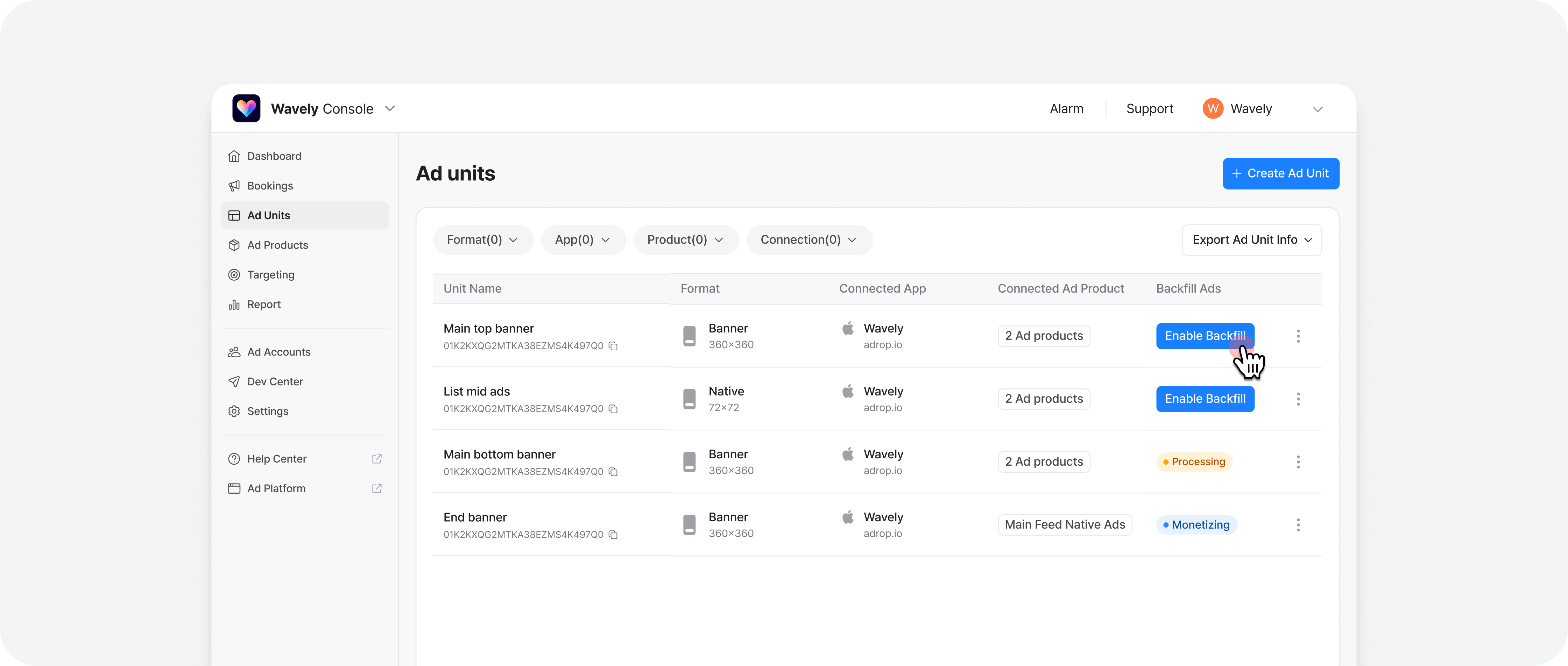 ### Start Ad Monetization
In the Ad Unit menu, click the 'Turn on Backfill Ads' button for the unit you want to start ad monetization.
If you're not using the latest SDK, you'll need help from a developer to update for Backfill feature usage.
[Setup Guide →](https://docs.adrop.io/sdk/overview#supported-ad-formats)
### Start Ad Monetization
In the Ad Unit menu, click the 'Turn on Backfill Ads' button for the unit you want to start ad monetization.
If you're not using the latest SDK, you'll need help from a developer to update for Backfill feature usage.
[Setup Guide →](https://docs.adrop.io/sdk/overview#supported-ad-formats)
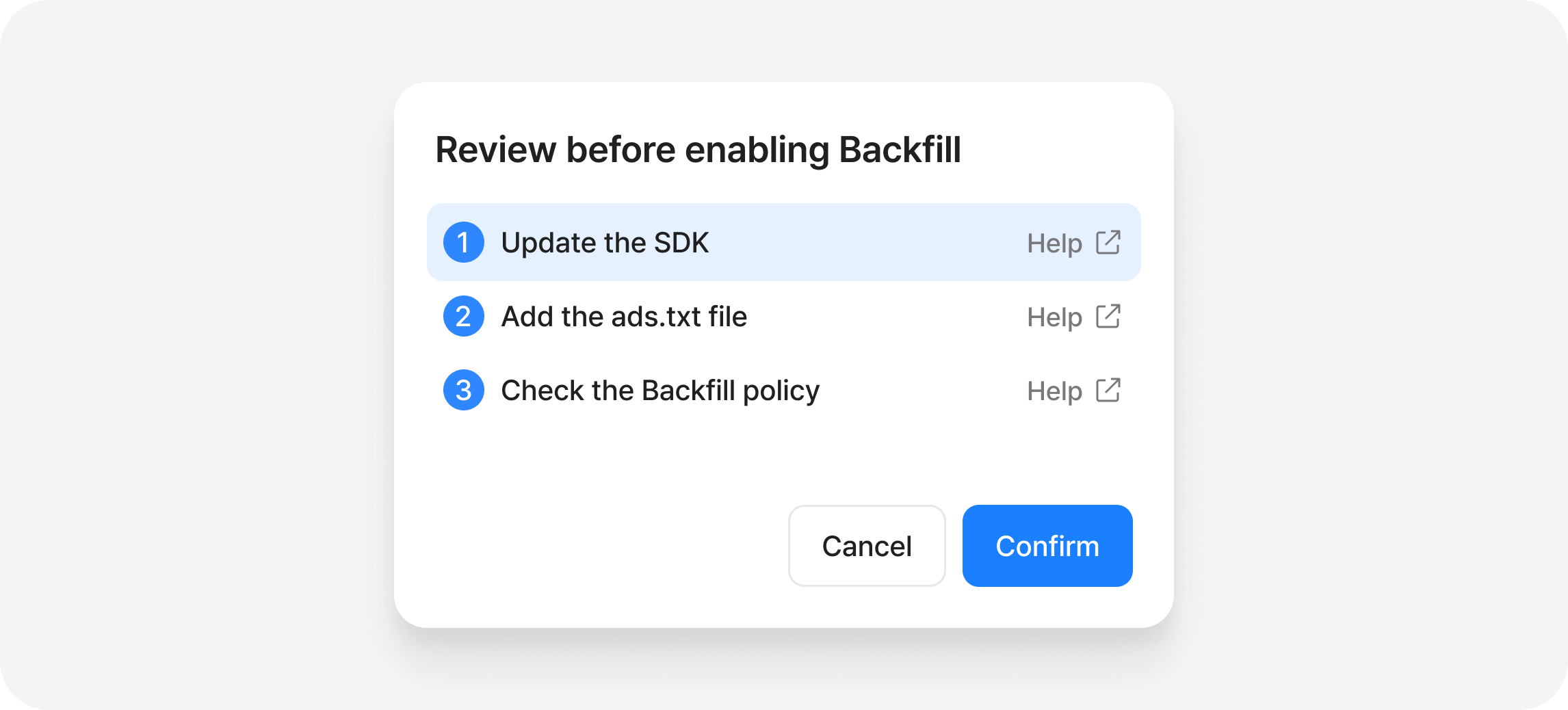 This is a method to certify that your ad placement is safe inventory, and needs to be added only once per app. If you've already added ads.txt, there's nothing additional to do.
[Setup Guide →](https://docs.adrop.io/sdk/ads_txt)
Once you've completed all the above steps, our team will begin review and the Backfill ad status in the console will change to 'Monetizing' within 2 business days. You can check revenue in the Reports menu 6 hours after ad monetization starts.
Upon first activation request, a representative will contact you for optimized operation of direct and Backfill ads.
## Pause Ad Monetization
Backfill ads can be paused and restarted at any time.
* Status changes are reflected within **maximum 30 minutes**.
* Does not affect direct ad campaigns.
***
## Turn Off Ad Monetization
You can completely delete Backfill integration info and turn off Backfill ads.
Turning off Backfill ads will delete integration info. Turning it back on later requires re-setup of integration info, so ads will not be served immediately.
***
## Supported Ad Types
Check the supported ad units by format and development environment for ad units created in the console.
| Ad Format | Native App | Web (WebView Mobile App) | Notes |
| ------------------ | ---------- | ------------------------ | ------------------------------------------------------------------------------------------ |
| **Banner** | Y | Y | |
| **Interstitial** | Y | N | |
| **Rewarded Video** | Y | N | |
| **Native** | Y | Y | For web environments, supported as full image banner format fitted to container area. |
| **Popup** | N | N | If you want Backfill for popups, we recommend implementing popups through banner ad units. |
| **Splash** | N | N | |
### Native Ad Specifics
* In native app environments, ads are served using ad fields. For optimal monetization, please use all available fields.
* Available ad fields: Advertiser logo, Advertiser name, Call-to-Action (CTA) button, Ad title, Ad description
* **Note**: Some fields may not be displayed depending on the creative assets prepared by the advertiser.
* In web environments, native ad fields are not used, and ads are served as banners fitted to the entire ad area specification.
### WebView Mobile App Environment Specifics
**Site Approval:** Backfill ad monetization is only possible after ad network site approval is completed. Review may be rejected in the following cases:
* When the top-level domain has insufficient content
* When sitemap is not configured
***
## Ad Quality Management
Since Backfill ads are monetized through real-time bidding from various ad networks, pre-screening of creatives is not possible unlike direct ads. Adrop provides safe ad monetization services by automatically blocking sensitive categories and conducting regular/irregular creative quality monitoring and improvement work.
1. Automatic Sensitive Category Blocking
Ads from the following categories are blocked by default.
* Adult content
* Direct sexual references
* Social casino games
* Gambling and betting
2. Creative Quality Monitoring
We continuously manage ad creative quality through regular and irregular monitoring, and periodically strengthen blocking of inappropriate advertisers and creatives based on monitoring results.
***
## Custom Blocking Options
If you have additional categories or advertiser lists you'd like to block, please submit them using the method below.
### Submission Method
Please make a copy of this [template](https://docs.google.com/spreadsheets/d/1NaHro1ng9on_MoKEL9OqxNoU_TWqKcwCZrT4c5Y9_z8/edit?gid=1591726783#gid=1591726783) file.
Please enter \[Company Name] in the file name.
Please create your blocking list.
* General category blocking: Set to Blocked
* Sensitive category blocking: Set to Blocked
* Advertiser blocking: Enter the top-level domain URL of advertisers
Submit the completed file to [contact@adrop.io](mailto:contact@adrop.io).
***
## Checking Backfill Performance and Revenue
You can check ad performance and revenue in the Reports > **Backfill** tab.
| **Metric** | **Description** |
| --------------- | ----------------------------------------------------------- |
| **Impressions** | Number of times ads were actually displayed on user screens |
| **Clicks** | Number of times users clicked on ads |
| **CTR** | Rate of clicks among ad impressions |
| **CPC** | Ad revenue per 1 click |
| **CPM** | Revenue per 1,000 ad impressions |
| **Revenue** | Final ad revenue after Adrop commission deduction |
| **Show Rate** | Ratio of ads displayed in the app relative to ad requests |
### Report Update Cycle
Backfill reports are automatically updated every 6 hours and may take up to 24 hours to reflect the latest data.
### Segments
Select a segment to break down data by that criteria.
| Segment | Description |
| -------- | -------------------------------- |
| **Unit** | Compare backfill revenue by unit |
### View by Date
With a segment selected, use the **By Date** checkbox to toggle date breakdown.
* **Checked**: Daily data is expanded under each segment item
* **Unchecked**: Only summary data per segment item is displayed
When no segment is selected, date is the base axis and the checkbox is disabled.
### Export
You can export files via email by clicking CSV Export.
***
## Next Steps
Check how to bundle Ad Units to sell as Ad Products.
***
## FAQ
Direct ads automatically display first, and Backfill only fills inventory without direct ads. No manual switching work required. With other solutions, developers must modify code each time direct ads come in, but Ad Control automatically coordinates direct ads and Backfill within a single Ad Unit.
Not recommended. Unifying with Ad Control Ad Units allows real-time switching between direct ads and network ads to maximize revenue. Mixing multiple solutions consumes unnecessary resources in operations and development, and you can't enjoy the benefits of integrated reporting and optimization. To seriously expand your ad business, managing direct ads and Backfill together on one platform is efficient.
Actually recommended. Start monetization with Backfill first while accumulating traffic data. This data becomes powerful negotiation material during direct ad sales. Once advertisers are secured, just register Ad Products in Console. You can switch to direct ad monetization immediately without separate development.
Network ads have pricing limits because they receive ads displayed simultaneously on multiple apps through auction. In contrast, direct ads can receive premium pricing as advertisers purchase specific apps and placements. Securing base revenue with Backfill while increasing direct ad proportion is the key to revenue maximization.
This is a method to certify that your ad placement is safe inventory, and needs to be added only once per app. If you've already added ads.txt, there's nothing additional to do.
[Setup Guide →](https://docs.adrop.io/sdk/ads_txt)
Once you've completed all the above steps, our team will begin review and the Backfill ad status in the console will change to 'Monetizing' within 2 business days. You can check revenue in the Reports menu 6 hours after ad monetization starts.
Upon first activation request, a representative will contact you for optimized operation of direct and Backfill ads.
## Pause Ad Monetization
Backfill ads can be paused and restarted at any time.
* Status changes are reflected within **maximum 30 minutes**.
* Does not affect direct ad campaigns.
***
## Turn Off Ad Monetization
You can completely delete Backfill integration info and turn off Backfill ads.
Turning off Backfill ads will delete integration info. Turning it back on later requires re-setup of integration info, so ads will not be served immediately.
***
## Supported Ad Types
Check the supported ad units by format and development environment for ad units created in the console.
| Ad Format | Native App | Web (WebView Mobile App) | Notes |
| ------------------ | ---------- | ------------------------ | ------------------------------------------------------------------------------------------ |
| **Banner** | Y | Y | |
| **Interstitial** | Y | N | |
| **Rewarded Video** | Y | N | |
| **Native** | Y | Y | For web environments, supported as full image banner format fitted to container area. |
| **Popup** | N | N | If you want Backfill for popups, we recommend implementing popups through banner ad units. |
| **Splash** | N | N | |
### Native Ad Specifics
* In native app environments, ads are served using ad fields. For optimal monetization, please use all available fields.
* Available ad fields: Advertiser logo, Advertiser name, Call-to-Action (CTA) button, Ad title, Ad description
* **Note**: Some fields may not be displayed depending on the creative assets prepared by the advertiser.
* In web environments, native ad fields are not used, and ads are served as banners fitted to the entire ad area specification.
### WebView Mobile App Environment Specifics
**Site Approval:** Backfill ad monetization is only possible after ad network site approval is completed. Review may be rejected in the following cases:
* When the top-level domain has insufficient content
* When sitemap is not configured
***
## Ad Quality Management
Since Backfill ads are monetized through real-time bidding from various ad networks, pre-screening of creatives is not possible unlike direct ads. Adrop provides safe ad monetization services by automatically blocking sensitive categories and conducting regular/irregular creative quality monitoring and improvement work.
1. Automatic Sensitive Category Blocking
Ads from the following categories are blocked by default.
* Adult content
* Direct sexual references
* Social casino games
* Gambling and betting
2. Creative Quality Monitoring
We continuously manage ad creative quality through regular and irregular monitoring, and periodically strengthen blocking of inappropriate advertisers and creatives based on monitoring results.
***
## Custom Blocking Options
If you have additional categories or advertiser lists you'd like to block, please submit them using the method below.
### Submission Method
Please make a copy of this [template](https://docs.google.com/spreadsheets/d/1NaHro1ng9on_MoKEL9OqxNoU_TWqKcwCZrT4c5Y9_z8/edit?gid=1591726783#gid=1591726783) file.
Please enter \[Company Name] in the file name.
Please create your blocking list.
* General category blocking: Set to Blocked
* Sensitive category blocking: Set to Blocked
* Advertiser blocking: Enter the top-level domain URL of advertisers
Submit the completed file to [contact@adrop.io](mailto:contact@adrop.io).
***
## Checking Backfill Performance and Revenue
You can check ad performance and revenue in the Reports > **Backfill** tab.
| **Metric** | **Description** |
| --------------- | ----------------------------------------------------------- |
| **Impressions** | Number of times ads were actually displayed on user screens |
| **Clicks** | Number of times users clicked on ads |
| **CTR** | Rate of clicks among ad impressions |
| **CPC** | Ad revenue per 1 click |
| **CPM** | Revenue per 1,000 ad impressions |
| **Revenue** | Final ad revenue after Adrop commission deduction |
| **Show Rate** | Ratio of ads displayed in the app relative to ad requests |
### Report Update Cycle
Backfill reports are automatically updated every 6 hours and may take up to 24 hours to reflect the latest data.
### Segments
Select a segment to break down data by that criteria.
| Segment | Description |
| -------- | -------------------------------- |
| **Unit** | Compare backfill revenue by unit |
### View by Date
With a segment selected, use the **By Date** checkbox to toggle date breakdown.
* **Checked**: Daily data is expanded under each segment item
* **Unchecked**: Only summary data per segment item is displayed
When no segment is selected, date is the base axis and the checkbox is disabled.
### Export
You can export files via email by clicking CSV Export.
***
## Next Steps
Check how to bundle Ad Units to sell as Ad Products.
***
## FAQ
Direct ads automatically display first, and Backfill only fills inventory without direct ads. No manual switching work required. With other solutions, developers must modify code each time direct ads come in, but Ad Control automatically coordinates direct ads and Backfill within a single Ad Unit.
Not recommended. Unifying with Ad Control Ad Units allows real-time switching between direct ads and network ads to maximize revenue. Mixing multiple solutions consumes unnecessary resources in operations and development, and you can't enjoy the benefits of integrated reporting and optimization. To seriously expand your ad business, managing direct ads and Backfill together on one platform is efficient.
Actually recommended. Start monetization with Backfill first while accumulating traffic data. This data becomes powerful negotiation material during direct ad sales. Once advertisers are secured, just register Ad Products in Console. You can switch to direct ad monetization immediately without separate development.
Network ads have pricing limits because they receive ads displayed simultaneously on multiple apps through auction. In contrast, direct ads can receive premium pricing as advertisers purchase specific apps and placements. Securing base revenue with Backfill while increasing direct ad proportion is the key to revenue maximization.