> ## Documentation Index
> Fetch the complete documentation index at: https://docs.adrop.io/llms.txt
> Use this file to discover all available pages before exploring further.
# Creating an Ad Platform
> A guide to creating an Ad Platform.
## Creation Method
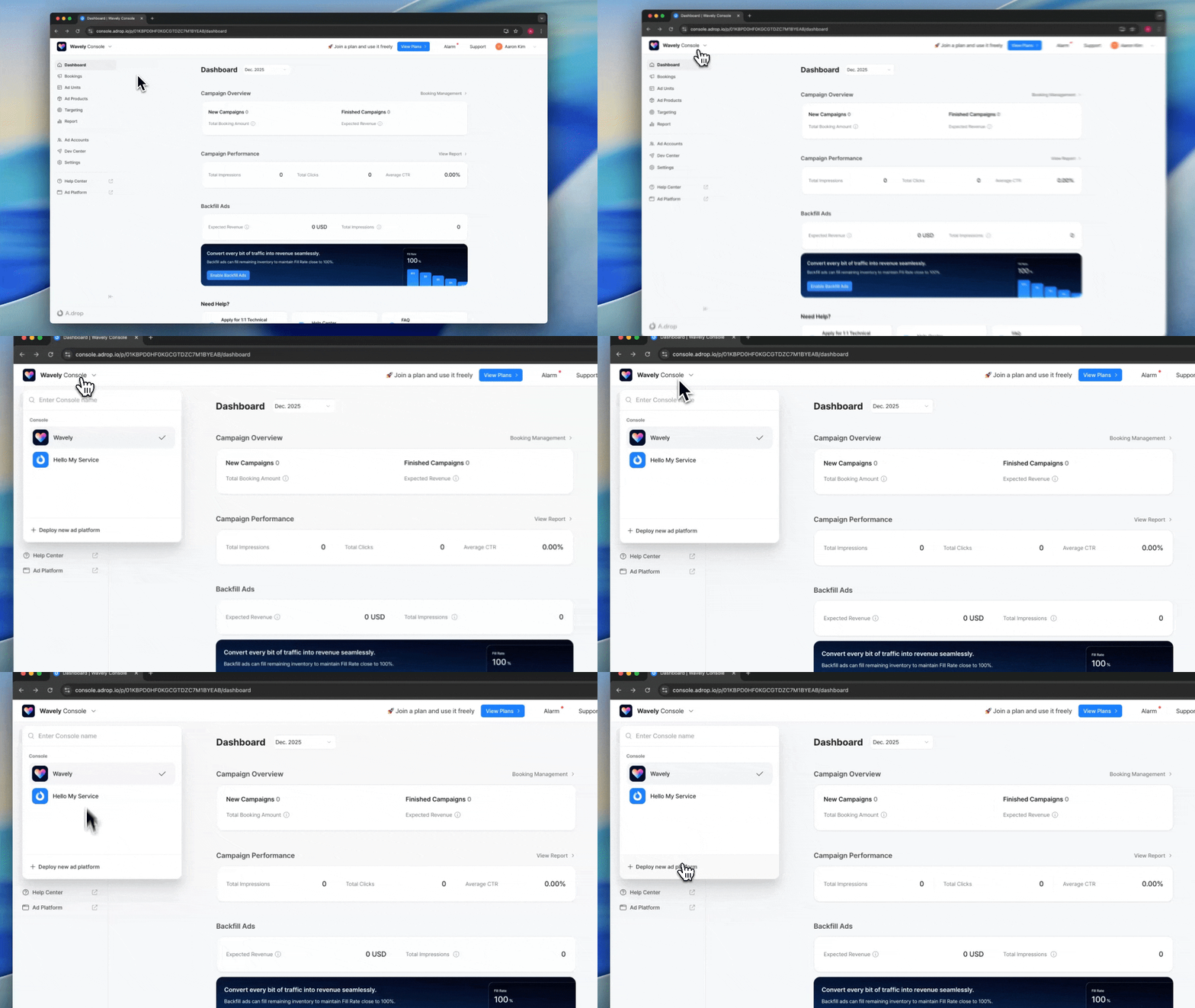 Click on the project name in the top left
Click **\[Deploy new Ad Platform]** at the bottom of the dropdown menu
***
## Service Name
* Enter your official name (2-20 characters)
* Korean, English, and numbers are allowed
* Display it clearly as it will be shown to advertisers
## Logo and Theme Color
* **Format**: PNG or SVG recommended
* **Size**: 256px or larger
* **Theme Color**: Automatically extracted from the logo and applied throughout the Ad Platform
Border correction is recommended if the logo background color has low contrast
## Subdomain
This is the link to share with advertisers.
* **Allowed characters**: Lowercase letters, numbers, hyphen (-)
* **Final link**: `https://{your-input}.adrop.io`
* **No duplicates**: Cannot use domains already in use by other publishers
* **Modifiable**: Can be changed after creation
## Operating Region Settings
| Item | Description |
| ------------ | -------------------------------------------------------------------------------------------------------------------------- |
| **Country** | Select the accounting base region. Used for Settlement and business information, and currency follows the country default. |
| **Timezone** | The timezone applied when booking Campaigns or viewing reports in the Console. |
| **Language** | The language used in the Console. |
Advertisers will see the timezone and language according to their own settings.
Register only a single service per Ad Platform. While platform-specific apps (Android/iOS/Web) can be operated together, mixing different services will affect targeting data accuracy.
***
## Next Steps
Set up branding and service information
***
## FAQ
Yes. You can create separate Ad Platforms for each service. Each platform has independent branding, Ad Products, and Settlement systems.
By default, it's provided in the format `{subdomain}.adrop.io`. If you need a custom domain, please contact us separately.
Yes. When you share the Ad Platform link, advertisers can directly access it to review products, book Campaigns, register Creatives, and make payments in a self-service manner.
Click on the project name in the top left
Click **\[Deploy new Ad Platform]** at the bottom of the dropdown menu
***
## Service Name
* Enter your official name (2-20 characters)
* Korean, English, and numbers are allowed
* Display it clearly as it will be shown to advertisers
## Logo and Theme Color
* **Format**: PNG or SVG recommended
* **Size**: 256px or larger
* **Theme Color**: Automatically extracted from the logo and applied throughout the Ad Platform
Border correction is recommended if the logo background color has low contrast
## Subdomain
This is the link to share with advertisers.
* **Allowed characters**: Lowercase letters, numbers, hyphen (-)
* **Final link**: `https://{your-input}.adrop.io`
* **No duplicates**: Cannot use domains already in use by other publishers
* **Modifiable**: Can be changed after creation
## Operating Region Settings
| Item | Description |
| ------------ | -------------------------------------------------------------------------------------------------------------------------- |
| **Country** | Select the accounting base region. Used for Settlement and business information, and currency follows the country default. |
| **Timezone** | The timezone applied when booking Campaigns or viewing reports in the Console. |
| **Language** | The language used in the Console. |
Advertisers will see the timezone and language according to their own settings.
Register only a single service per Ad Platform. While platform-specific apps (Android/iOS/Web) can be operated together, mixing different services will affect targeting data accuracy.
***
## Next Steps
Set up branding and service information
***
## FAQ
Yes. You can create separate Ad Platforms for each service. Each platform has independent branding, Ad Products, and Settlement systems.
By default, it's provided in the format `{subdomain}.adrop.io`. If you need a custom domain, please contact us separately.
Yes. When you share the Ad Platform link, advertisers can directly access it to review products, book Campaigns, register Creatives, and make payments in a self-service manner.