> ## Documentation Index
> Fetch the complete documentation index at: https://docs.adrop.io/llms.txt
> Use this file to discover all available pages before exploring further.
# Joining Ad Note
> List your Ad Products on Ad Note to connect with more advertisers and enable real-time bookings.
***
## What is Ad Note?
**Ad Note** is an advertiser community platform where publishers can list their advertising inventory. By joining Ad Note, your Ad Products gain visibility in the marketplace, enabling discovery by more advertisers.
### Benefits of Joining
| Benefit | Description |
| ------------------------ | ------------------------------------------------------------------------------------------------------- |
| **Increased Visibility** | Your Ad Products are exposed to advertisers in the Ad Note community |
| **AI Agent Support** | Adrop's AI agent analyzes your Ad Product brochure and automatically recommends products to advertisers |
| **Real-time Booking** | Advertisers can book campaigns directly through Ad Note |
| **Unified Management** | Profile updates in Console sync to Ad Note in real-time |
Campaigns executed through Ad Note are subject to agency commission fees per the Ad Control Terms of Service.
***
## Requirements
Before applying, ensure you have:
* An active Ad Control Console account
* Completed business information and payout account setup
* Ad Product public registration: Set Ad Products you want to sell through Ad Note to 'public' status, and set products excluded from sale to 'private'.
All Ad Control plans, including the free Stream plan, are eligible to join Ad Note. However, to offer instant booking to advertisers, you need a Wave plan or higher and at least one published Ad Product.
***
## How to Join
Click the **Join Ad Note** button in the Settings menu sidebar to view a checklist of required items. Complete each item to enable your application.
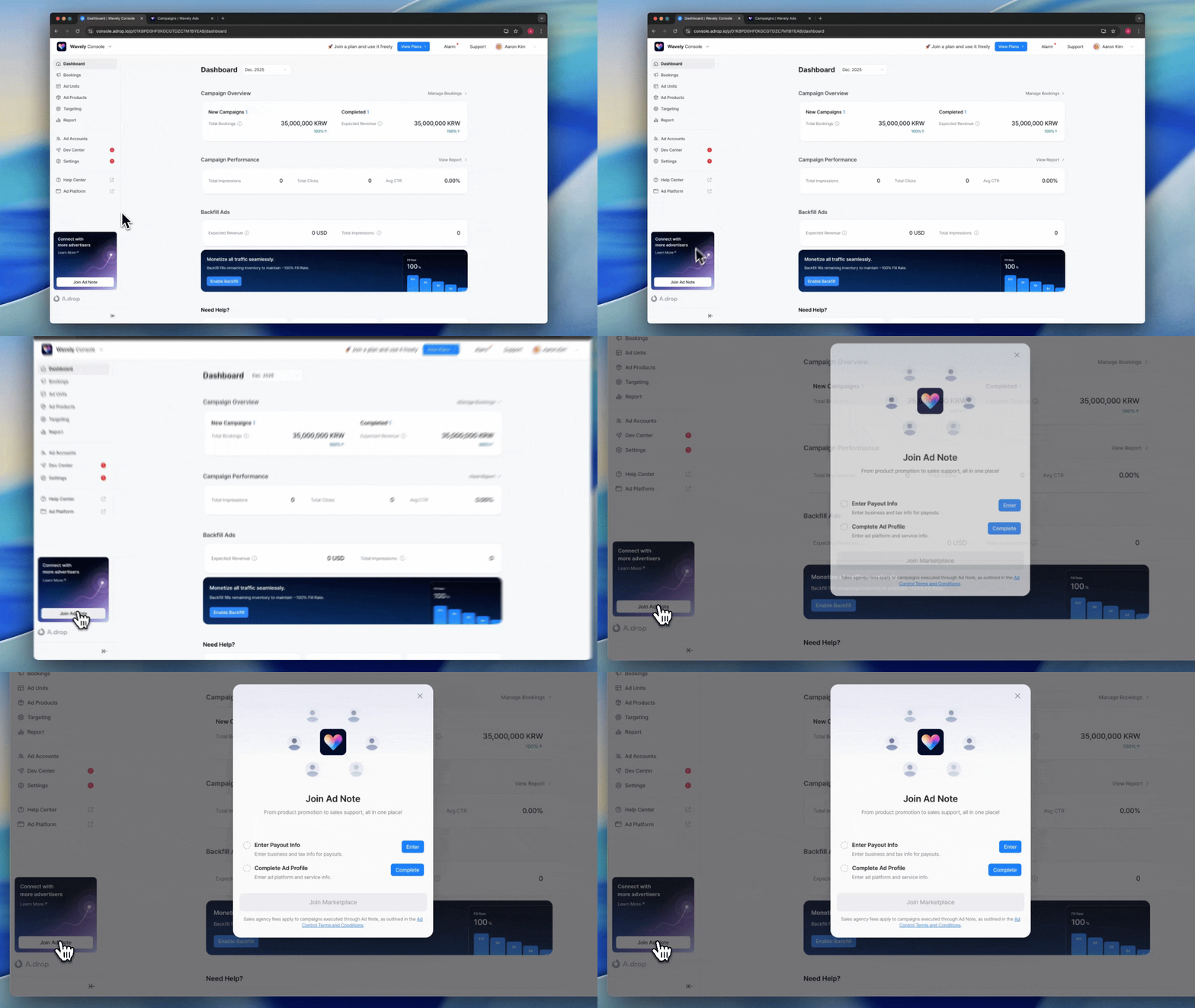 ### Checklist
Register your business information and payout account for receiving Ad Note campaign revenue.
1. Click **Settings** in the left menu.
2. Select the **Revenue Payout** tab.
3. Enter the following information:
**Business Information**
* Business name
* Business registration number
* Business registration certificate file
* Billing contact email
**Payout Account**
* Account holder name
* Bank
* Account number
* Bank statement copy
View detailed setup instructions
Configure your Ad Platform information and service details that will be displayed to advertisers.
1. Click **Settings** in the left menu.
2. Select the **Ad Profile** tab.
#### Ad Platform Information
| Field | Description |
| --------------------- | ---------------------------------------- |
| **Ad Platform Name** | Name displayed to advertisers |
| **Logo** | Ad Platform logo image |
| **Brand Color** | Color applied to buttons and backgrounds |
| **Thumbnail** | Image displayed when links are shared |
| **Primary Email** | Email for advertiser inquiries |
| **Regional Settings** | Country, timezone, language |
#### Service Information
**Ad Note Brochure Upload**
Upload a PDF brochure for advertisers. The AI agent will analyze this to automatically recommend products to advertisers.
| Guideline | Description |
| ------------------------------------ | ------------------------------------------------------------------ |
| **No Direct Contact Info** | Use only `contact@adrop.io` for contact information |
| **Consistent Product Names** | Match brochure product names with Console product names |
| **Remove Confidential Info** | Exclude any information that cannot be shared externally |
| **No Individual Policies/Processes** | Exclude individual publisher policies and custom booking processes |
**Service Description**
| Field | Description |
| ------------------------ | ------------------------------------------------------------------------------------------------------------------------------------ |
| **Category** | Select the category that best fits your service |
| **One-Line Description** | Used as the title for your Ad Product introduction. Highlight your service's differentiated reach and core target audience strengths |
| **Detailed Description** | Describe the campaign types your service is particularly well-suited for |
Use the Preview button to verify how your information displays on the Ad Platform and Ad Note.
***
## Submit Application
Once all checklist items are complete, the **Join** button will be enabled.
1. Complete all checklist items.
2. Click the **Join** button.
3. Our team will review your application.
4. Once approved, your Ad Products will automatically appear in the Ad Note community.
When your application is submitted, you'll see the message: "Your Ad Note application has been submitted. Your listing will appear on Ad Note after review is complete."
***
## After Joining
### Real-time Sync
Profile updates in Console sync to Ad Note instantly. Changes to product information, service descriptions, or promotional materials take immediate effect.
### Promotion Management
You can create promotions to attract advertisers. They will be posted on the promotions page when you join Ad Note.
Learn how to set up discounts and free trials
***
## Operating Policy
The following policies apply to campaign booking, approval, and settlement through Ad Note.
### Campaign Terms
Advertisers book campaigns based on the [**Ad.Note Campaign Terms**](/legal/adnote-campaign-terms), not individual publisher policies. Agency commission policies and cancellation penalty policies also follow Ad Note's common standards.
### Campaign and Creative Approval
| Item | Description |
| ------------------------------ | ---------------------------------------------------------------------------------------------------------------------- |
| **Ad Note Campaign Indicator** | Campaigns with an A.drop logo are booked through Ad Note |
| **Review Obligation** | Publishers must review and approve campaigns and creatives in the Console |
| **Review Deadline** | [Campaign review deadlines](/management/review#review-deadline) and creative review (within 48 hours) must be followed |
### Cancellation Penalties
Campaign booking is confirmed upon publisher approval. If an approved campaign is cancelled due to unilateral reasons by the publisher, cancellation penalties will be charged according to the [Ad.Note Campaign Terms](/legal/adnote-campaign-terms).
If campaign rejection, approval delays, or unilateral contract termination occur repeatedly without legitimate reasons such as internal policies or legal issues, it may affect ad product sales and result in Ad Note listing being restricted or rejected.
### Ad Spend Settlement
Ad spend settlement is handled directly between Adrop and the advertiser. Agency commission (incentive) policies are applied flexibly according to Ad Note policies.
### Fee Information
**Sales Commission**
For campaigns connected through Ad Note, revenue is paid after deducting a 20% commission from ad spend. However, if there is a separate sales partnership agreement, that contract's commission rate takes precedence.
**Card Payment Fees**
When advertisers pay by card, payment processing fees are charged separately.
| Payment Region | PG Provider | Fee |
| ---------------- | ------------- | ---- |
| Domestic (Korea) | Toss Payments | 3.2% |
| International | Stripe | 5.5% |
***
## Next Steps
Set up Ad Units to include in your Ad Products
***
## FAQ
You need an active Ad Control Console account with completed business information and payout account. All plans including the free Stream plan are eligible. To offer instant booking, you need a Wave plan or higher and at least one published Ad Product.
Include your Ad Product lineup, pricing, expected performance, and creative guidelines. Avoid direct contact information (use `contact@adrop.io` for ad inquiries), confidential data, and individual publisher policies.
Changes apply instantly. When you modify your profile in Console settings, it is immediately reflected in the Ad Note community.
Campaigns executed through Ad Note are subject to agency commission fees per the Ad Control Terms of Service.
Applications may be rejected if the submitted information doesn't meet our review criteria. Check the rejection reason, make necessary corrections, and resubmit your application.
### Checklist
Register your business information and payout account for receiving Ad Note campaign revenue.
1. Click **Settings** in the left menu.
2. Select the **Revenue Payout** tab.
3. Enter the following information:
**Business Information**
* Business name
* Business registration number
* Business registration certificate file
* Billing contact email
**Payout Account**
* Account holder name
* Bank
* Account number
* Bank statement copy
View detailed setup instructions
Configure your Ad Platform information and service details that will be displayed to advertisers.
1. Click **Settings** in the left menu.
2. Select the **Ad Profile** tab.
#### Ad Platform Information
| Field | Description |
| --------------------- | ---------------------------------------- |
| **Ad Platform Name** | Name displayed to advertisers |
| **Logo** | Ad Platform logo image |
| **Brand Color** | Color applied to buttons and backgrounds |
| **Thumbnail** | Image displayed when links are shared |
| **Primary Email** | Email for advertiser inquiries |
| **Regional Settings** | Country, timezone, language |
#### Service Information
**Ad Note Brochure Upload**
Upload a PDF brochure for advertisers. The AI agent will analyze this to automatically recommend products to advertisers.
| Guideline | Description |
| ------------------------------------ | ------------------------------------------------------------------ |
| **No Direct Contact Info** | Use only `contact@adrop.io` for contact information |
| **Consistent Product Names** | Match brochure product names with Console product names |
| **Remove Confidential Info** | Exclude any information that cannot be shared externally |
| **No Individual Policies/Processes** | Exclude individual publisher policies and custom booking processes |
**Service Description**
| Field | Description |
| ------------------------ | ------------------------------------------------------------------------------------------------------------------------------------ |
| **Category** | Select the category that best fits your service |
| **One-Line Description** | Used as the title for your Ad Product introduction. Highlight your service's differentiated reach and core target audience strengths |
| **Detailed Description** | Describe the campaign types your service is particularly well-suited for |
Use the Preview button to verify how your information displays on the Ad Platform and Ad Note.
***
## Submit Application
Once all checklist items are complete, the **Join** button will be enabled.
1. Complete all checklist items.
2. Click the **Join** button.
3. Our team will review your application.
4. Once approved, your Ad Products will automatically appear in the Ad Note community.
When your application is submitted, you'll see the message: "Your Ad Note application has been submitted. Your listing will appear on Ad Note after review is complete."
***
## After Joining
### Real-time Sync
Profile updates in Console sync to Ad Note instantly. Changes to product information, service descriptions, or promotional materials take immediate effect.
### Promotion Management
You can create promotions to attract advertisers. They will be posted on the promotions page when you join Ad Note.
Learn how to set up discounts and free trials
***
## Operating Policy
The following policies apply to campaign booking, approval, and settlement through Ad Note.
### Campaign Terms
Advertisers book campaigns based on the [**Ad.Note Campaign Terms**](/legal/adnote-campaign-terms), not individual publisher policies. Agency commission policies and cancellation penalty policies also follow Ad Note's common standards.
### Campaign and Creative Approval
| Item | Description |
| ------------------------------ | ---------------------------------------------------------------------------------------------------------------------- |
| **Ad Note Campaign Indicator** | Campaigns with an A.drop logo are booked through Ad Note |
| **Review Obligation** | Publishers must review and approve campaigns and creatives in the Console |
| **Review Deadline** | [Campaign review deadlines](/management/review#review-deadline) and creative review (within 48 hours) must be followed |
### Cancellation Penalties
Campaign booking is confirmed upon publisher approval. If an approved campaign is cancelled due to unilateral reasons by the publisher, cancellation penalties will be charged according to the [Ad.Note Campaign Terms](/legal/adnote-campaign-terms).
If campaign rejection, approval delays, or unilateral contract termination occur repeatedly without legitimate reasons such as internal policies or legal issues, it may affect ad product sales and result in Ad Note listing being restricted or rejected.
### Ad Spend Settlement
Ad spend settlement is handled directly between Adrop and the advertiser. Agency commission (incentive) policies are applied flexibly according to Ad Note policies.
### Fee Information
**Sales Commission**
For campaigns connected through Ad Note, revenue is paid after deducting a 20% commission from ad spend. However, if there is a separate sales partnership agreement, that contract's commission rate takes precedence.
**Card Payment Fees**
When advertisers pay by card, payment processing fees are charged separately.
| Payment Region | PG Provider | Fee |
| ---------------- | ------------- | ---- |
| Domestic (Korea) | Toss Payments | 3.2% |
| International | Stripe | 5.5% |
***
## Next Steps
Set up Ad Units to include in your Ad Products
***
## FAQ
You need an active Ad Control Console account with completed business information and payout account. All plans including the free Stream plan are eligible. To offer instant booking, you need a Wave plan or higher and at least one published Ad Product.
Include your Ad Product lineup, pricing, expected performance, and creative guidelines. Avoid direct contact information (use `contact@adrop.io` for ad inquiries), confidential data, and individual publisher policies.
Changes apply instantly. When you modify your profile in Console settings, it is immediately reflected in the Ad Note community.
Campaigns executed through Ad Note are subject to agency commission fees per the Ad Control Terms of Service.
Applications may be rejected if the submitted information doesn't meet our review criteria. Check the rejection reason, make necessary corrections, and resubmit your application.